Patient Engagement Solutions
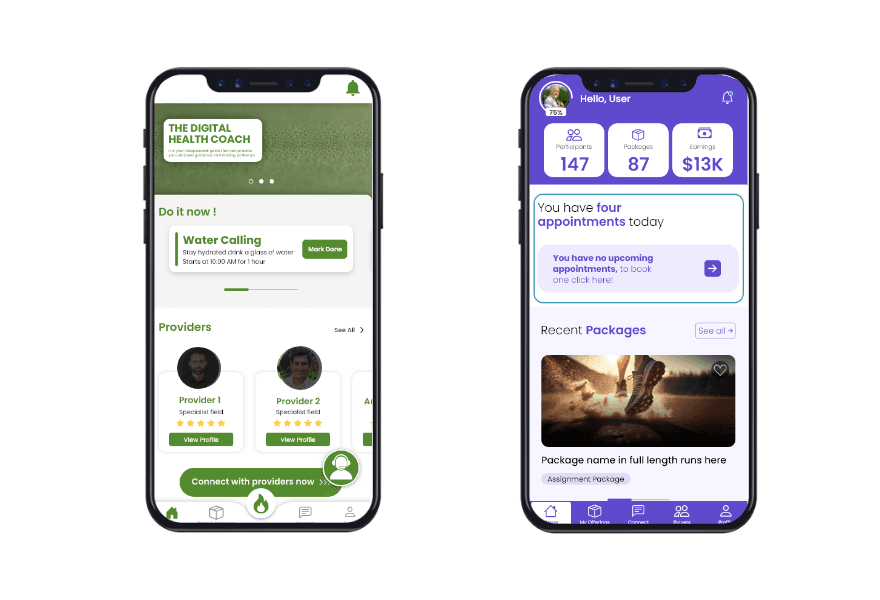
The objective was to enhance and customize the UI for a SaaS system used by provider and patients improving patient engagement and interaction.
1. Project Overview
Title: Patient Engagement Solutions – Enhancing Saas
Client: Prominent US-based healthcare organization
Role: UI Developer /UX Designer
Tools & Technologies: Angular, HTML, CSS, SCSS, JavaScript, Adobe XD, Ionic.
Scope: The objective was to enhance and customize the UI for a SaaS system used by patients, improving patient engagement and interaction.
2. Problem Statement
Challenge: The SaaS system lacked a user-friendly interface, making it difficult for patients to manage patient profiles and workflows efficiently. The system needed to be visually intuitive, responsive, and compatible across all browsers, while providing a personalized experience for patients based on their behaviors and interactions.
Objective: To redesign and implement a responsive UI that enhances the agent's ability to manage patient data and offer personalized healthcare journeys.
3. Research & Insights
Research Process:
We conducted user research and interviews with patients to understand pain points.
Analyzed competitor systems and current market trends in patient engagement.
Gathered data on patient behaviors and how this could be reflected in CRM interactions.
Key Insights:
patients struggled with navigating complex workflows.
There was a need for clearer visual cues to represent patient journeys.
The UI had to be simple yet powerful enough to handle extensive patient data.
4. Design Approach
Wireframes & Prototypes:
Created wireframes in Adobe XD for a mobile-optimized and browser-compatible interface.
Prototyped personalized patient journey interfaces and 360º patient profile views.
User Testing: Conducted several rounds of usability testing with real patients to validate design decisions and ensure the interface met their needs.
Challenges Overcome: Ensured cross-browser compatibility and optimized performance, especially for slower systems commonly used in call centers.
5. Solution Implementation
UI Design: Delivered a clean, intuitive UI that allowed patients to easily view and manage patient profiles with dynamic visualizations of patient journeys.
Front-End Development: Collaborated with developers to implement the design using Angular, ensuring modularity, scalability, and seamless integration into the healthcare system.
Customization: Developed customizable widgets and dashboards for patients, providing flexibility based on individual needs.
6. Impact & Results
Patient Productivity: Improved efficiency and reduced time spent on each feature due to the more intuitive interface and streamlined workflows.
Patient Engagement: The new UI helped in delivering personalized healthcare experiences, which led to higher patient satisfaction.
Cross-Browser Compatibility: Ensured smooth operation across all browsers, including legacy versions commonly used in healthcare Organization.
Client Feedback: Received positive feedback for enhancing usability and ensuring seamless integration with the healthcare ecosystem.
7. Reflection & Learnings
What Went Well: Implementing a UI that met both the technical and usability requirements, ensuring cross-browser compatibility, and providing dynamic patient journeys.
Challenges: Balancing performance and visual appeal, particularly in environments with slower systems.
Key Takeaways: Understanding the intersection of patient data management and usability in healthcare systems, especially in environments like call centers.